


Are you trying to complete the Real-Name Verification on your KEYDIY KD X4 only to be blocked by the error: “Subida fallida: Phone Number Has Been Registered (FaceBook)”?
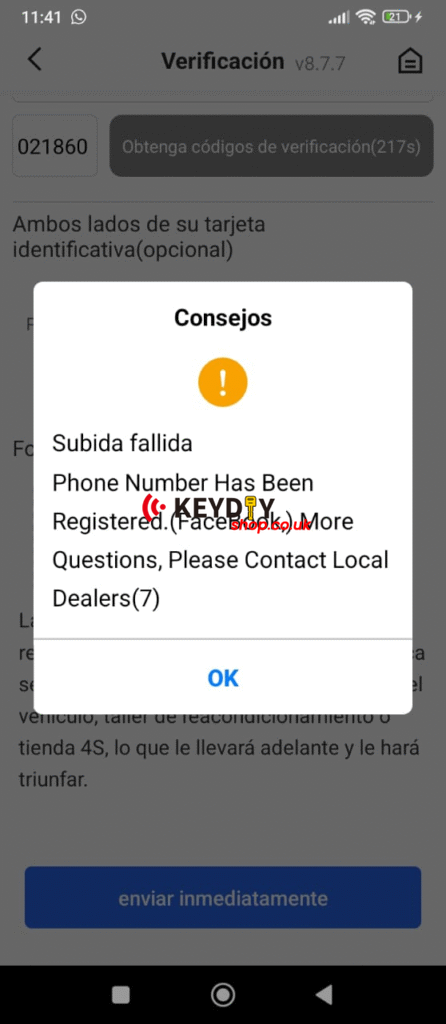
This is a common issue for users where a mobile number is already linked to a KD account via social media. Here are the two most effective ways to bypass this and get your device verified.
Option 1: The Facebook Authorisation Fix (Most Likely)
The error usually occurs because your phone number was previously linked to a Facebook account used for KD. Instead of creating a new login:
- Go to the KD App login screen.
- Select “Login with Facebook” (authorise the app).
- Once logged in via Facebook, try the Real-Name Verification again. This should sync your identity with the existing record.
Option 2: Direct Mobile Login
If Facebook isn’t working, try logging in directly with the mobile number to see if an old account exists:
- Enter your mobile number in the login field.
- Request a verification code.
- Try using the default or previous code (e.g., 200909) or your latest SMS code to access the account.
- Once inside, you can check if the account needs to be unbound or updated.
Still Stuck?
If neither method works, the system may require a manual reset. Please contact your local dealer with a screenshot of the error code (usually ending in (7)) and your device Serial Number (SN). They can coordinate with KEYDIY technical support to unbind the number for you.
Or if you register two phone number, contact engineer to combine two for you.